iFLYTEK Spark Smart Blackboard is an AI focused classroom display designed to combine traditional teaching habits with intelligent digital tools. It is presented as more than a board: an AI teaching assistant that supports interactive lessons, content presentation, handwriting, multimedia teaching and classroom collaboration.
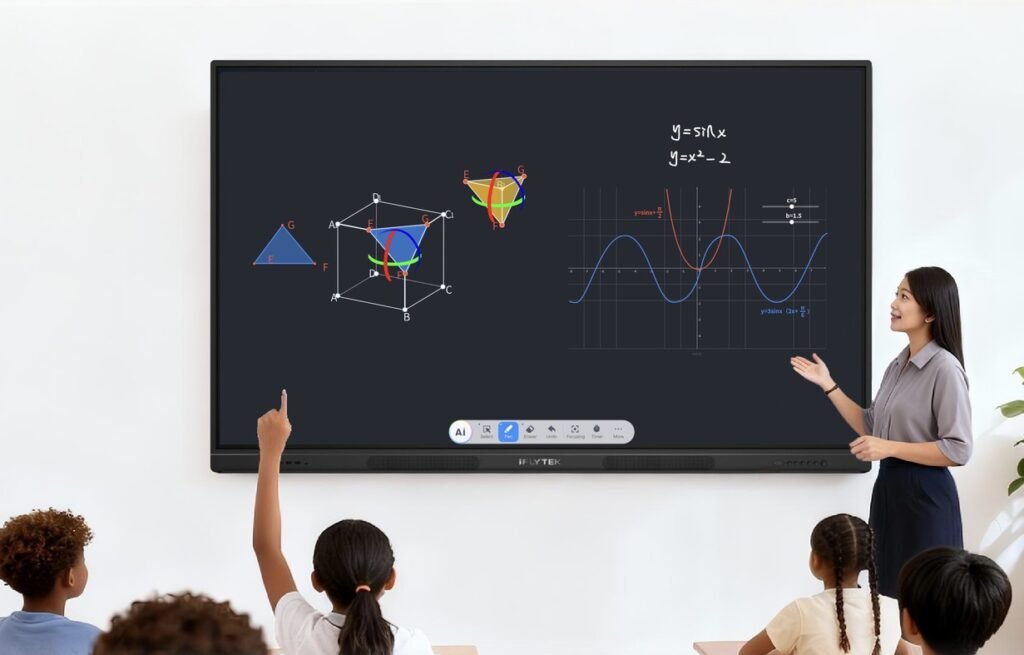
AI Teaching Experience
The blackboard is positioned around AI plus education, using iFLYTEK’s long standing artificial intelligence and education technology experience to support lesson delivery. Its AI assistant concept is designed to help teachers present, explain, capture and manage classroom content more efficiently. Public product information highlights intelligent dialogue, meeting and lesson summaries, transcription, translation and handwriting recognition as part of iFLYTEK’s broader AI learning ecosystem.
Display and Writing Experience
The Spark Smart Blackboard uses an 86 inch 4K UHD display with a 3840 by 2160 resolution at 60Hz. It is designed for classroom scale visibility, with optical bonding or zero bonding technology to create a more direct writing and viewing experience. The listed response time is no more than 8ms, helping writing and touch interaction feel responsive during lessons. With typical brightness of at least 400 cd per square metre and a wide colour gamut, the display is built for daily classroom use across written notes, diagrams, presentations and multimedia content.
Classroom Collaboration and Content Capture
For teachers, the main value is the ability to bring lessons, annotations, documents, visuals and interactive activities into one central classroom interface. Supporting information describes smart camera, long range pickup, AI audio distribution and lesson recording concepts that help students hear, see and review classroom content more clearly. This makes the device useful not only for in person instruction, but also for hybrid learning, recorded lessons and post class review.
Key Specifications
| Category | Details |
| Product name | Spark Smart Blackboard |
| Model | GOV AIT86A |
| Display size | 86 inch |
| Resolution | 4K UHD, 3840 by 2160 at 60Hz |
| Response time | No more than 8ms |
| Colour gamut | NTSC at least 85 percent |
| Bonding technology | Optical bonding or zero bonding |
| Brightness | At least 400 cd per square metre typical |
| Contrast ratio | VA 5000 to 1 or IPS 1200 to 1 |
| Memory and storage | 8GB RAM and 128GB ROM |
| Operating system | Android 14 |
What It Can Do
The iFLYTEK Spark Smart Blackboard can work as a central teaching display, digital whiteboard, presentation screen and AI assisted classroom hub. Teachers can use it to write notes, annotate teaching materials, show slides, play multimedia content, capture lesson content and support more interactive classroom activities. Its AI focused design also supports smarter lesson workflows such as content recognition, voice related functions, transcription style features, translation support and lesson review, depending on the selected configuration and software services.
- Display lesson slides, diagrams, documents, videos and web based teaching resources on a large 86 inch 4K screen.
- Let teachers write, draw, highlight and annotate directly on the board during a lesson.
- Capture and save board content so students and teachers can review lesson material after class.
- Support hybrid or recorded teaching by combining screen display, audio pickup, smart camera concepts and lesson recording workflows.
- Use AI assisted features to make classroom content easier to organise, explain, translate, transcribe and review.
- Act as a shared collaboration surface for group problem solving, brainstorming, class discussions and interactive activities.
Use Cases
| Use case | How the blackboard helps |
| Everyday classroom teaching | Teachers can combine handwriting, slides, diagrams, websites and videos in one large interactive teaching space. |
| Lecture halls and universities | The 86 inch 4K display gives larger rooms a clear central teaching surface for explanations, formulas, charts and recorded lecture content. |
| Hybrid learning | The board can support lesson recording, remote viewing workflows and reviewable teaching content for students who are not physically in class. |
| Language learning | AI assisted translation, transcription style tools and clear audio related functions can support listening, speaking and multilingual lesson activities. |
| STEM lessons | Teachers can sketch formulas, diagrams, charts, experiments and problem solving steps while keeping the content visible and reusable. |
| Teacher training and professional development | Training centres can use the blackboard for demonstrations, workshops, collaborative planning and session review. |
| Meeting and administration rooms | Education teams can use it for presentations, planning sessions, policy briefings, brainstorming and shared document review. |
Who It Is For
iFLYTEK Spark Smart Blackboard is best suited to education organisations that want to modernise classroom teaching without losing the familiar feel of board based instruction. It is especially relevant for smart classrooms, lecture halls, tutoring centres, training rooms and institutions that need a shared teaching surface for writing, presenting, annotating, recording and reviewing lessons.
Pros
- Large 86 inch 4K display is suitable for classrooms, lecture halls and training environments.
- AI teaching assistant positioning helps differentiate it from ordinary interactive displays.
- Optical bonding or zero bonding can improve writing precision and viewing clarity.
- Android 14, 8GB RAM and 128GB ROM provide a modern software and hardware platform.
- Designed for lesson presentation, annotation, collaboration, recording and review in one device.
Cons
- Pricing, installation requirements and regional availability may vary and are not always visible on the public product page.
- Schools may need network, training and IT support to get full value from the AI and collaboration features.
- The product is likely best suited to institutional buyers rather than individual home users.
- Real classroom results will depend on teacher adoption, software integration and support quality.
Buying Considerations
- Confirm local availability, warranty coverage, installation support and after sales service before purchase.
- Check compatibility with your school’s learning management system, device management tools and classroom network.
- Ask whether AI transcription, translation, recording, cloud storage or third party app features require additional accounts, licences or subscriptions.
- Evaluate the display in a real classroom setting to confirm visibility, audio pickup, writing feel and teacher workflow.