The Lenovo Legion Pro 7i Gen 10 is a high-end 16-inch gaming laptop aimed at users who prioritise performance over portability. It combines Intel Core Ultra HX processors, NVIDIA GeForce RTX 50-series laptop graphics, a 240Hz OLED display, and a cooling system designed for sustained plugged-in use.
The Lenovo Legion Pro 7i Gen 10 is a powerful 16-inch gaming laptop with a strong OLED display, high-end RTX graphics options, and cooling designed for sustained plugged-in performance. It is best for users who value performance over portability. For everyday mobility or long unplugged use, a lighter laptop is a better fit.
Design and Build Quality
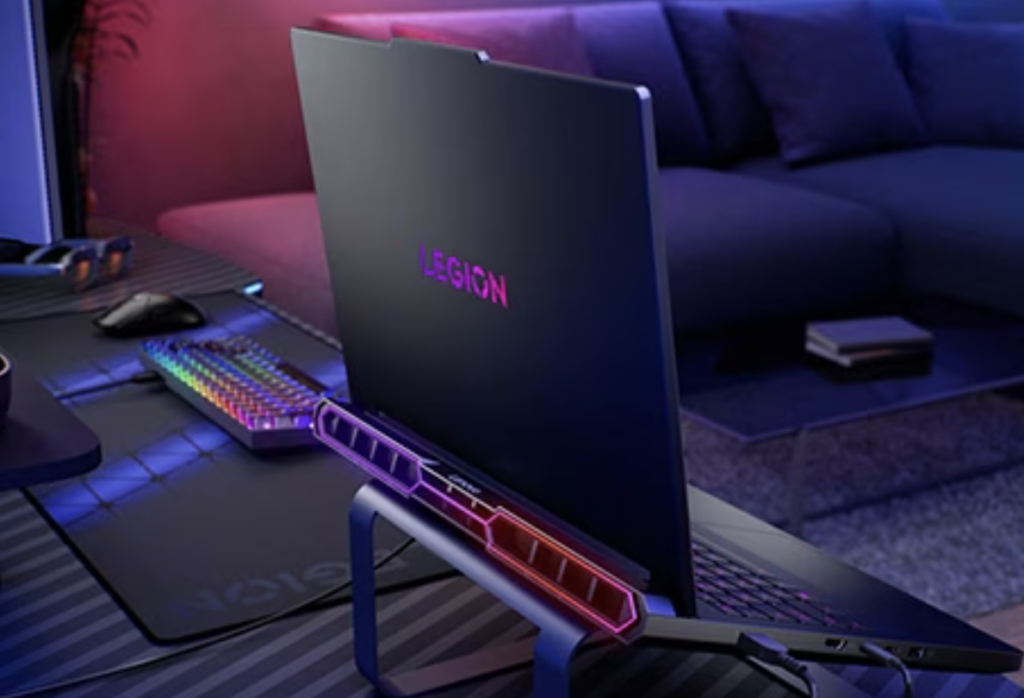
The chassis uses Lenovo’s Legion design language with an Eclipse Black finish, aluminium construction on many configurations, per-key RGB lighting, and a practical port layout. It looks like a gaming laptop but avoids excessive styling.
At roughly 2.57-2.72 kg, it is better suited to desk-to-desk use than daily commuting. The larger body supports stronger cooling and higher sustained GPU power.
Display: 16-inch OLED Built for Speed and Colour
The 16-inch WQXGA OLED display has a 2560 x 1600 resolution, 16:10 aspect ratio, 240Hz refresh rate, 500-nit brightness rating, 100% DCI-P3 coverage, and HDR True Black support.
The panel suits both gaming and creative work. The main drawback is the glossy finish, which can show reflections in bright environments.
Performance: Desktop-Class Ambition in a Laptop Body
Configuration options include Intel Core Ultra HX processors and NVIDIA GeForce RTX 5070 Ti, RTX 5080, or RTX 5090 laptop graphics. The laptop is designed for high-refresh gaming, ray tracing, streaming, video editing, 3D rendering, development work, and local AI tasks.
The RTX 5080 and RTX 5090 configurations offer the strongest long-term headroom, especially for ray tracing, high-resolution gaming, and GPU-accelerated creative workloads.
Cooling, Power, and Noise
The thicker chassis and high-wattage power adapter help sustained performance but increase heat and fan noise under load.
For best results, use the laptop plugged in, on a desk, with clear airflow and a higher performance mode enabled.
Battery Life: Big Battery, Realistic Expectations
The 99.9Wh battery is large, but runtime is limited by the OLED display, HX-class CPU, RTX graphics, RGB lighting, and cooling hardware. Light use such as browsing, writing, email, and video playback will last longer with Quiet mode, 60Hz refresh, lower brightness, RGB disabled, and integrated graphics.
Gaming or rendering on battery will drain it quickly and reduce performance. The laptop is best treated as a movable desktop replacement, not an all-day productivity laptop.
Gaming Experience
The Legion Pro 7i Gen 10 is built for demanding games at 2560 x 1600, especially when paired with DLSS and appropriate ray tracing settings. The 240Hz OLED display is most useful in shooters, racing games, and esports titles.
Choose the GPU based on workload: RTX 5070 Ti suits many gamers, RTX 5080 offers a strong balance of performance and cost, and RTX 5090 is for maximum VRAM and headroom.
The main caveat is that buyers should choose the GPU carefully. The RTX 5070 Ti version may already be excellent for many gamers, while RTX 5080 and RTX 5090 configurations are better suited to users chasing higher settings, more VRAM, heavier creative workloads, or longer-term headroom.
Heavy Game Performance Expectations
For heavy games, expect the best results from RTX 5080 or RTX 5090 configurations while plugged in. In Cyberpunk 2077, the laptop is best used at 2560 x 1600 with high settings, DLSS 4, and adjusted ray tracing rather than forcing every setting to maximum at native resolution. In Monster Hunter Wilds, review coverage points to the RTX 5080 model remaining competitive in a demanding modern title, especially when performance modes and upscaling are used. Other graphics-heavy games with ray tracing or large open worlds should also benefit from the 175W-class RTX 5080/5090 GPU options, but DLSS and frame generation will often be needed for the smoothest experience at the laptop’s native resolution.
Creator and Productivity Use
Creators can use the GPU for video editing, 3D rendering, simulation, and AI-assisted workflows. Developers benefit from the high-core-count CPU, fast storage, Wi-Fi 7, and external display support. Video editors can benefit from the high-refresh OLED panel, fast storage, large memory options, and NVIDIA acceleration.
Pros and Cons
- Pros: 240Hz OLED display, strong CPU/GPU options, Wi-Fi 7, useful ports, strong creator performance, and upgrade-friendly memory/storage configuration.
- Cons: Heavy, expensive in high-end configurations, noisy under load, reflective glossy display, and limited battery life for gaming.
Detailed Specifications Table
| Category | Lenovo Legion Pro 7i Gen 10 Details |
| Model family | Lenovo Legion Pro 7i Gen 10, 16-inch Intel gaming laptop; PSREF family: Legion Pro 7 16IAX10H |
| Processor family | Intel HX Series Core Ultra 7 / Core Ultra 9 Processor, Series 2 |
| Processor options | Up to Intel Core Ultra 9 290HX Plus; common options include Core Ultra 7 255HX, Core Ultra 9 275HX, and Core Ultra 9 290HX Plus |
| CPU cores and threads | Core Ultra 7 255HX: 20 cores / 20 threads; Core Ultra 9 275HX and Core Ultra 9 290HX Plus: 24 cores / 24 threads |
| CPU boost frequency and cache | Core Ultra 9 275HX: up to 5.4GHz P-core / 4.6GHz E-core, 36MB Intel Smart Cache; Core Ultra 9 290HX Plus: up to 5.5GHz P-core / 4.7GHz E-core, 36MB Intel Smart Cache |
| AI / NPU | AI-Powered Gaming PC with integrated Intel AI Boost NPU, up to 13 TOPS; overall platform AI performance up to 36 TOPS on Core Ultra 9 configurations |
| Chipset | Intel HM870 chipset |
| Graphics options | NVIDIA GeForce RTX 5070 Ti Laptop GPU, RTX 5080 Laptop GPU, or up to RTX 5090 Laptop GPU depending on configuration and market availability |
| GPU memory, TGP, and AI TOPS | RTX 5070 Ti: 12GB GDDR7, 2220MHz boost clock, 140W TGP, 992 AI TOPS; RTX 5080: 16GB GDDR7, 2287MHz boost clock, 175W TGP, 1334 AI TOPS; RTX 5090: 24GB GDDR7, 2160MHz boost clock, 175W TGP, 1824 AI TOPS |
| GPU features | DLSS 4 and DirectX 12 Ultimate support on listed RTX 50-series configurations |
| Display | 16-inch WQXGA OLED, 2560 x 1600 resolution, 16:10 aspect ratio, 240Hz refresh rate, 500 nits, glossy finish, 100% DCI-P3, DisplayHDR True Black 1000, Dolby Vision, G-SYNC, Low Blue Light, and High Gaming Performance certification on listed configurations |
| Colour calibration | Factory colour calibration on official PSREF-listed models |
| Memory | Up to 64GB DDR5-6400; two DDR5 CSODIMM slots, dual-channel capable |
| Storage | 1TB or 2TB M.2 NVMe SSD options commonly listed; storage support up to two drives using M.2 SSDs |
| Storage slots | Two M.2 slots: one M.2 2280 PCIe 5.0 x4 slot and one M.2 2280 PCIe 4.0 x4 slot |
| Monitor support | Supports up to four independent displays: the native display plus up to three external monitors via HDMI and USB-C; HDMI and USB-C support up to 8K@60Hz with compatible displays |
| Wireless | Wi-Fi 7, 802.11be 2×2, and Bluetooth 5.4 on listed models |
| Ethernet | 2.5GbE RJ-45 Ethernet |
| Camera and microphones | 5.0MP camera with electronic shutter and dual-array microphones |
| Keyboard | Per-key RGB backlit keyboard; bundled 4 switchable keycaps on some models |
| Touchpad | Buttonless Mylar surface multi-touch touchpad, 75 x 120 mm |
| Audio | High Definition Audio with Realtek ALC3306 codec; four stereo speakers with 2W x2 woofers and 2W x2 tweeters, optimised with Nahimic Audio and Smart Amplifier |
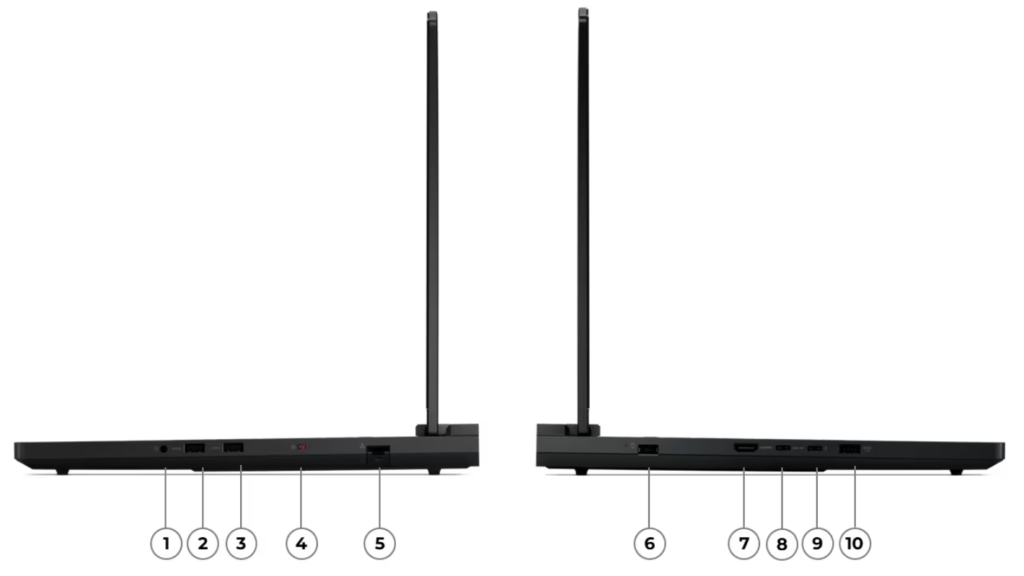
| Ports | 2x USB-A 5Gbps, 1x USB-A 10Gbps Always On, 1x USB-C 10Gbps with USB Power Delivery and DisplayPort 2.1, 1x Thunderbolt 4 / USB4 40Gbps with DisplayPort 2.1, 1x HDMI 2.1 up to 8K@60Hz, 1x headphone/microphone combo jack, 1x 2.5GbE RJ-45, and 1x power connector |
| Docking | Compatible with docking solutions via Thunderbolt or USB-C |
| Battery | Integrated 99.9Wh battery |
| Power adapter | 400W Slim Tip 3-pin power adapter on high-end listed configurations |
| Special features | Lenovo AI Engine+ platform features and LA3 AI chip on PSREF-listed models |
| Case colour and materials | Eclipse Black; aluminium top and aluminium bottom with anodizing sandblasting surface treatment |
| Pen support | Pen not supported |
| Dimensions and weight | Approximately 364.38 x 275.94 x 21.9–26.65 mm; starting at 2.57 kg |
| Operating system | Windows 11 Pro, Windows 11 Home, Windows 11 Home Single Language, or no preload operating system depending on configuration and region |
| Security and privacy | Firmware TPM 2.0 enabled and electronic camera shutter |
| Green certifications | ErP Lot 3 and RoHS compliant |
| Other certifications | TÜV Rheinland High Gaming Performance and TÜV Rheinland Low Blue Light Hardware Solution; some listings also note Flicker Free certification |
| Base warranty | Warranty varies by region and model; PSREF-listed retail models commonly show 2-year Courier or Carry-in, with optional Premium Care upgrades |
| Best suited for | High-end gaming, esports, streaming, 3D rendering, video editing, AI workloads, software development, and heavy multitasking |
Who Should Buy It?
Buy it if you want a high-performance gaming and creator laptop that will mostly be used plugged in. It suits gamers, streamers, video editors, 3D artists, developers, and users who need strong GPU performance.
Skip it if you need long battery life, quiet operation, low weight, or a laptop for frequent travel.
FAQ
Is the Lenovo Legion Pro 7i Gen 10 good for 4K gaming?
It is best matched to its native 2560 x 1600 display, but RTX 5080 and RTX 5090 configurations can handle 4K output to an external monitor in many games with DLSS and adjusted settings.
Which GPU configuration should most buyers choose?
The RTX 5080 model is likely the best balance for many high-end users. The RTX 5070 Ti is suitable for many gamers, while the RTX 5090 is best for users who need maximum VRAM and performance headroom.
Can it replace a desktop gaming PC?
For many users, yes. It has strong CPU and GPU options, a high-refresh OLED display, fast storage, and broad connectivity. A desktop still offers easier upgrades and quieter cooling, but this laptop is a capable desktop replacement.
How is the battery life?
The 99.9Wh battery is large, but the laptop is not built for all-day unplugged use. Light tasks can last longer with power-saving settings, but gaming or rendering should be done while plugged in.
Is the OLED display good for creators?
Yes. The 16-inch 2560 x 1600 OLED panel, 100% DCI-P3 coverage, and high refresh rate make it useful for video editing, design work, and colour-rich content. Colour-critical work should still use calibration.
Is it easy to carry every day?
Not really. At over 2.5 kg plus a large power adapter, it is better for desk-to-desk use than frequent travel or daily commuting.