The ASUS ROG Zephyrus G16 2026 is a slim 16-inch gaming laptop built around portability, premium materials, and high-end performance. It pairs Intel’s Core Ultra 9 386H processor with NVIDIA GeForce RTX 50-series laptop graphics in a thin aluminium chassis.
Design and Portability
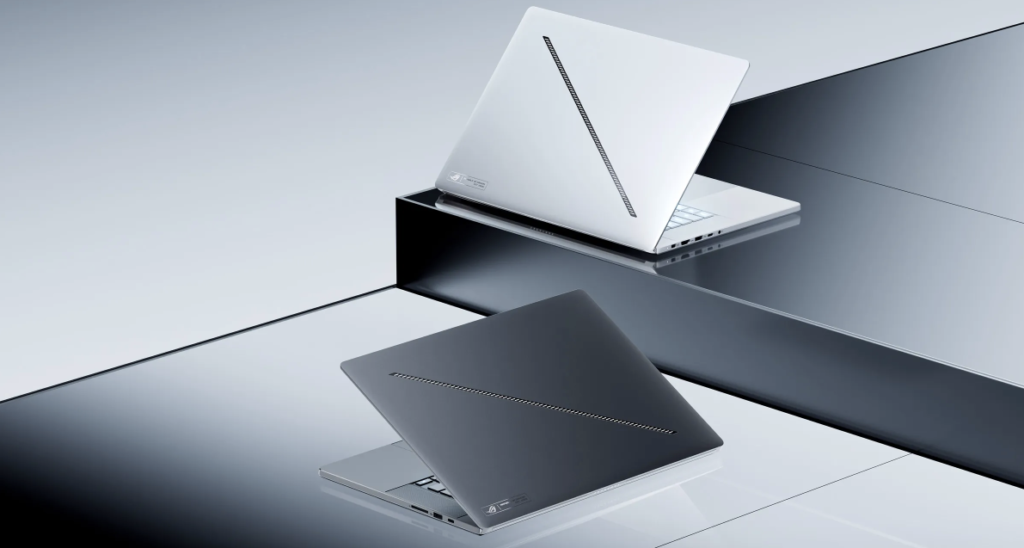
The Zephyrus G16 focuses on a different balance from thicker desktop-replacement laptops. ASUS lists a 1.49 cm chassis and a starting weight around 1.85 kg, making it much easier to carry than many high-power 16-inch gaming laptops. The CNC aluminium body and 35-zone Slash Lighting give it a premium but still recognisably gaming-focused design.
Display
The 16-inch ROG Nebula HDR OLED display is a major strength. Official specifications list a 2560 x 1600 resolution, 16:10 aspect ratio, 240Hz refresh rate, 0.2ms response time, 100% DCI-P3 coverage, Pantone validation, G-SYNC support, and up to 1100 nits peak HDR brightness on listed configurations.
Performance
ASUS positions the 2026 G16 as a premium portable performance laptop. The Intel Core Ultra 9 386H provides 16 cores, 16 threads, and an Intel NPU rated up to 50 TOPS. GPU options range from RTX 5060 through RTX 5090 laptop graphics depending on configuration.
The thinner chassis means it is not designed to match the sustained GPU power of the largest gaming laptops, but higher-end RTX 5080 and RTX 5090 configurations should still provide strong 1600p gaming, creator acceleration, and AI performance when plugged in.
Cooling, Power, and Noise
ROG Intelligent Cooling varies by configuration and may include a vapor chamber, Tri-Fan Technology, liquid metal thermal compound, Arc Flow Fans, and redesigned exhaust vents. These features are important because the G16 is trying to deliver high-end performance in a thin chassis.
Battery Life
The Zephyrus G16 uses a 90Wh battery. ASUS also lists fast charging from 0-50% in about 30 minutes on retail configurations. Light use should benefit from the efficient processor, OLED panel controls, and integrated graphics, but gaming or rendering should still be done while plugged in.
Gaming Experience
The G16 is best matched to 2560 x 1600 gaming. RTX 5070 and RTX 5070 Ti configurations suit high-quality gaming with tuned settings, while RTX 5080 and RTX 5090 versions are better suited to heavier ray tracing, creator workloads, and longer-term headroom. DLSS and frame generation are important for demanding games at the native resolution.
Heavy Game Performance Expectations
In demanding games such as Cyberpunk 2077, Alan Wake 2, and other ray-traced AAA titles, the RTX 5080 and RTX 5090 models are the best fit. Expect to use DLSS, frame generation, and adjusted ray tracing settings rather than relying on native maximum settings. Competitive games are more likely to take advantage of the 240Hz OLED panel, especially when graphics settings are tuned for high frame rates.
Creator and Productivity Use
The G16 is well suited to video editing, design work, coding, AI-assisted workflows, and travel-friendly creative use. The OLED display, Intel NPU, RTX graphics, fast LPDDR5X memory, and dual M.2 storage support make it more versatile than a gaming-only laptop.
Pros and Cons
- Pros: Slim and light for a 16-inch gaming laptop, strong OLED display, RTX 50-series options, 50 TOPS Intel NPU, premium aluminium build, good creator features, and useful ports including Thunderbolt 4 and SD card reader.
- Cons: Expensive high-end configurations, soldered memory with no expansion, reduced sustained power compared with thicker gaming laptops, and battery life still limited during gaming.
Detailed Specifications Table
| Category | ASUS ROG Zephyrus G16 2026 Details |
| Model family | ASUS ROG Zephyrus G16 2026 GU606 |
| Operating system | Windows 11 Home or Windows 11 Pro depending on configuration and region |
| Processor | Intel Core Ultra 9 Processor 386H, 2.1GHz base, up to 4.9GHz, 18MB cache, 16 cores, 16 threads |
| AI / NPU | Intel NPU up to 50 TOPS; Copilot+ PC positioning on listed configurations |
| Graphics options | NVIDIA GeForce RTX 5060, RTX 5070, RTX 5070 Ti, RTX 5080, or RTX 5090 Laptop GPU depending on configuration |
| GPU power examples | RTX 5070 listed up to 115W; RTX 5070 Ti listed up to 140W in Manual mode; RTX 5080 listed up to 160W in Manual mode; exact limits vary by SKU |
| Display | 16-inch ROG Nebula HDR OLED, 2560 x 1600 WQXGA, 16:10, 240Hz, 0.2ms response time, anti-reflection finish, 100% DCI-P3, Pantone Validated, G-SYNC, VESA DisplayHDR True Black 1000, up to 1100 nits peak HDR brightness on listed models |
| Memory | Up to 64GB LPDDR5X-8533 memory depending on configuration; some retail configurations list 32GB onboard memory with no expansion |
| Storage | Up to 2TB PCIe 4.0 NVMe M.2 SSD; stock configuration may include one SSD with a second M.2 slot available for expansion |
| Wireless | Modern Wi-Fi and Bluetooth support varies by SKU; official store listings should be checked for region-specific wireless configuration |
| Ports | HDMI 2.1 FRL, two USB 3.2 Gen 2 Type-A ports, one USB 3.2 Gen 2 Type-C with DisplayPort, Power Delivery, and G-SYNC support, one Thunderbolt 4 port with DisplayPort and Power Delivery, SD UHS-II card reader, and 3.5mm combo audio jack |
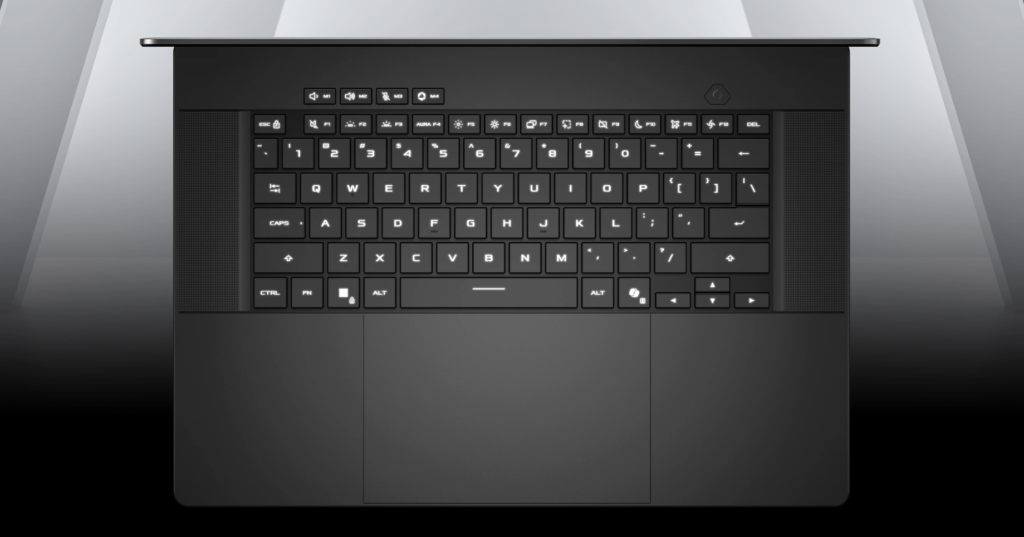
| Keyboard and touchpad | Backlit chiclet keyboard with 1-zone RGB, Copilot key on listed models, and large touchpad |
| Audio | ROG audio features vary by configuration; official pages highlight AI noise cancellation and creator/gaming audio features |
| Cooling | ROG Intelligent Cooling with features that may include vapor chamber, Tri-Fan Technology, Arc Flow Fans, liquid metal thermal compound, and redesigned exhaust vents depending on SKU |
| Battery | 90Wh battery; listed fast charge support from 0-50% in about 30 minutes on some retail configurations |
| Chassis | CNC-machined aluminium chassis with 35-zone Slash Lighting |
| Dimensions and weight | Approximately 1.49 cm thick and around 1.85 kg on official product positioning; retail listings may vary slightly by configuration |
| Best suited for | Portable high-end gaming, creative work, video editing, coding, AI-assisted workflows, and users who want strong performance in a slim 16-inch chassis |
Who Should Buy It?
Buy it if you want a premium 16-inch laptop that balances gaming performance, creator features, and portability. It is a better fit for travellers and hybrid users than heavier desktop-replacement laptops.
Skip it if you need maximum sustained GPU power, upgradeable memory, or the best value per frame.
The ASUS ROG Zephyrus G16 2026 is a strong choice for users who want a premium, portable 16-inch gaming laptop with an excellent OLED display and modern AI-capable hardware. It is not the most powerful option for sustained desktop-class gaming, but it offers a better portability-performance balance than many thicker gaming laptops.
FAQ
Is the ROG Zephyrus G16 2026 good for travel?
Yes. Its slim 16-inch chassis and low weight make it much easier to travel with than larger desktop-replacement gaming laptops.
Which GPU should most buyers choose?
The RTX 5070 Ti or RTX 5080 configurations should be the best balance for many users. The RTX 5090 is for buyers who need maximum GPU headroom in this chassis.
Can the memory be upgraded?
Some configurations use onboard LPDDR5X memory with no expansion possible, so buyers should choose the memory capacity carefully at purchase.
Is it better than a thicker gaming laptop?
It is better for portability and premium design, but thicker laptops may offer higher sustained performance, easier upgrades, and lower fan noise under heavy load.