What Is Pocket AI and Official Video?
Pocket is a compact, screen-free AI note-taking device created for the conversations and ideas that happen away from a keyboard. Press its side button, speak normally, and Pocket records the session. Once the audio syncs, the companion software produces a transcript, summary, action items and mind map, turning a conversation into material you can search, review and use.
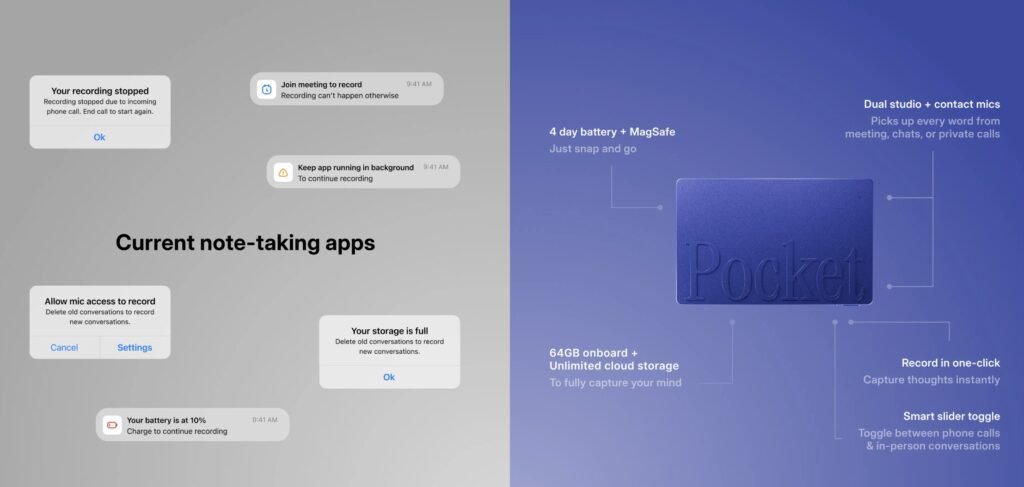
The product’s real proposition is not simply “record more.” A phone can already capture audio. Pocket is intended to remove the friction around recording and, more importantly, to organise what was said afterwards. Its dedicated hardware starts without unlocking a phone or opening an app, works offline, and supports both in person conversations and phone calls. That makes it less like a digital voice recorder and more like a portable memory and follow-through system.

Key Features of Pocket AI
1. One-Click, Screen-Free Recording
Pocket is built around a one press workflow: press once to begin, talk as usual, and press again to stop. A light and vibration provide confirmation. Because the hardware operates independently of the phone interface, it avoids notifications, app switching and the awkward pause of setting up a recording while a conversation is already underway.
2. Transcripts, Summaries, and Action Items
After syncing, Pocket converts a session into several layers of information: the full transcript for detail, a concise summary for rapid review, action items for follow through and a mind map for visual exploration. Their website also advertise more than 100 summary styles, allowing the output to be shaped around different workflows rather than forcing every conversation into the same generic meeting template.
This layered approach is important. Most users will not want to replay an hour of audio or read every line of a transcript. A useful AI note-taker should surface the decision, commitment, question or next step that matters, while retaining the original record when more context is needed.
3. Mind Maps and Structured Thinking
Mind maps give visual thinkers another way to revisit a discussion. Instead of presenting ideas only as a chronological transcript, Pocket can organise themes and relationships into branches. This can be especially useful after brainstorming sessions, interviews, lectures and strategy discussions where the connections between ideas matter as much as the exact order in which they were spoken.
4. Support for Calls and In-Person Conversations
Pocket records face-to-face discussions through two studio microphones and captures phone calls through a contact microphone when the device is attached to the back of a phone. Official specifications list a recording range of up to 15 metres, MagSafe attachment, 64GB of onboard storage, USB-C charging and support for iOS and Android. The device weighs 52 grams and is advertised with up to four days of battery life.
5. Unlimited Minutes and No Required Subscription for Core Features
Pocket’s core plan includes unlimited transcription minutes, transcriptions and summaries, with no mandatory subscription for core use. Buyers should still distinguish “no subscription required” from “every feature is free forever”: Pocket also offers a paid Pro tier for advanced capabilities such as higher accuracy transcription, automatic speaker identification, expanded AI features, templates, export options and longer cloud history.
6. Apps, Syncing, and Desktop Access
Recordings can be stored on the device while offline and processed after connectivity returns. Pocket’s official ecosystem includes mobile apps and web access, with Bluetooth, WiFi and USB-C interfaces listed in its materials. The practical benefit is continuity: capture in the room or on the move, then review and organise the result on a larger screen when convenient.
Practical Use Cases
Client-Facing Professionals
For consultants, sales professionals, real-estate agents and other client-facing workers, Pocket can preserve requirements, objections, commitments and next steps without turning the interaction into a typing exercise. The value is strongest when conversations happen in varied settings on the phone, at a property, between appointments or around a table rather than exclusively in video meetings with built in transcription.
Meetings, Team Sessions, and Project Work
In team meetings, Pocket can capture decisions, owners, blockers and follow ups while everyone remains engaged. Founders and project leads may also use the transcript as source material for briefs, proposals or status updates. The device is particularly relevant for informal discussions that produce important decisions but would not normally have a designated note taker.
Students, Researchers, and Learners
Students and researchers can capture lectures, study discussions and interviews, then work from summaries and searchable transcripts. Support for more than 120 languages and dialects broadens its usefulness, although users should still confirm that recording is permitted and should treat AI generated text as a draft that may require verification.
Creators, Founders, and Fast-Moving Thinkers
Ideas rarely arrive on schedule. Pocket gives creators, founders and other verbal thinkers a low friction way to capture a concept while walking, travelling or working through a problem aloud. The resulting summary and mind map can become the starting point for a plan, article, pitch or task list rather than another forgotten voice memo.
Reasons to Buy Pocket AI
- It reduces capture friction. A dedicated button is faster and less distracting than unlocking a phone and configuring an app.
- It produces usable outputs. Transcripts are complemented by summaries, action items, mind maps and multiple summary formats.
- It works beyond online meetings. Pocket is intended for phone calls, in-person discussions, field work, commutes and spontaneous ideas.
- Core transcription is not metered. Unlimited core minutes remove the pressure to ration recordings or monitor a monthly allowance.
- It has its own battery and storage. Offline recording and onboard memory make it useful when connectivity is unreliable.
- It is designed to stay unobtrusive. At 52 grams, with MagSafe attachment and multi-day battery life, Pocket is meant to remain available without becoming another screen competing for attention.
Privacy, Setup, and Support Details
Pocket says recordings are protected with encryption in transit and at rest, and that the product is designed with privacy at its core. Official sales materials also describe HIPAA-compliant operation. Even with those safeguards, recording consent remains the user’s responsibility: laws and workplace policies vary, and phone-call transcription should only be used with the required permission.
What to Consider Before Buying
Pocket is easiest to justify when important information regularly arrives through speech and across multiple environments. It may be less compelling if nearly all your meetings already take place on platforms that provide acceptable transcription, or if you rarely revisit recorded material.
AI transcription and speaker labelling can also make mistakes, so high stakes details should be checked against the audio. Finally, the free core tier and optional Pro tier are not identical; buyers who need advanced models, automatic speaker identification, extensive exports or longer cloud history should factor the paid plan into the total cost.
Free vs Paid Plans: What Does Pocket Include?
Every Pocket purchase includes the Core experience, so the device remains useful without a recurring subscription. Core covers unlimited transcription and summaries, while Pro adds the features that matter most when Pocket becomes a long-term work archive: higher accuracy processing, automatic speaker identification, conversational search, advanced AI tools, broader exports and unlimited cloud history. The clearest difference is therefore not how much you can record, but how intelligently and how far back you can work with what you recorded.
Plan Comparison
| Capability | Core (Free): Included with Pocket | Pro: Optional Paid Upgrade | Why the Difference Matters |
| Transcription usage | Unlimited transcription minutes, with no monthly recording cap. | Unlimited transcription remains included. | Heavy recording alone does not require Pro; both tiers support open-ended use. |
| Transcription quality | Standard Core transcription. | Higher accuracy transcription processing. | Pro is more relevant when names, technical language or client details require the strongest available processing. |
| Automatic transcripts and summaries | Unlimited transcripts and summaries, including Pocket’s essential note-taking output. | Unlimited access plus advanced processing and richer AI options. | Core already covers the fundamental record review workflow; Pro is about refinement and control. |
| Speaker identification | No automatic speaker identification is listed as a Core inclusion. | Automatic speaker identification and speaker separation. | This is valuable for interviews, multi-person meetings and client calls where attribution matters. |
| Ask Pocket | Not listed as unlimited in Core. | Unlimited Ask Pocket, allowing users to query recorded conversations. | Pro makes the archive more interactive you can retrieve answers instead of manually scanning transcripts. |
| Summary styles and templates | Essential summaries are included. | More than 100 summary styles, advanced templates and expanded AI features. | Professionals can shape notes for meetings, client sessions, research, sales or other repeatable workflows. |
| Mind maps | Core structured outputs are available. | Advanced mind maps are included in the official Pro package. | Pro offers more depth for brainstorming, strategy and connecting ideas visually. |
| AI model options | Uses the standard Core experience. | AI model selection and access to advanced AI models. | Model choice gives power users more control over how conversations are processed. |
| Export options | Essential sharing and everyday note use. | Expanded and bulk export options. | Pro is better suited to moving many records into research, CRM or documentation workflows. |
| Cloud conversation history | Access to the most recent 14 days. Older conversations are not deleted, but access is placed behind the Pro upgrade. | Full, unlimited cloud conversation history. | This is the biggest practical dividing line: Core suits recent note review, while Pro supports a durable knowledge archive. |
| New features | Receives the maintained Core feature set. | Early access to new features is included in the official annual Pro package. | Pro may appeal to users who want Pocket’s newest capabilities first. |
| Cost structure | No subscription required after buying the device. | Recurring paid access. An official 12-month Pro offer is listed at US$179, reduced from US$240; promotions may change. Aug 2026. | Compare the annual software cost with the value of long-term history and advanced workflow features. |
| Best suited to | Occasional users, personal idea capture, short term meeting review and buyers avoiding subscriptions. | Consultants, researchers, sales teams, interviewers and frequent users who rely on Pocket as a searchable work archive. | The right tier depends more on retrieval and workflow depth than on recording volume. |
Bottom line: Choose Core if you mainly need unlimited recording, transcripts and summaries for recent conversations. Choose Pro if you need reliable access to older conversations, stronger transcription, named speakers, unlimited conversational search, advanced templates or bulk exports.
Always Confirm the current subscription price and included features before purchasing.
Who Is the Free Core Plan For?
Core is the better fit for personal idea capture, occasional meetings and anyone who wants Pocket’s primary benefits without another subscription. You can record freely because transcription and summaries remain unlimited. The trade off is that cloud access centres on the latest 14 days, so Core works best when notes are reviewed, acted on or moved into another system soon after recording.
Who Should Consider Pocket Pro?
Pro is designed for users who need Pocket to function as an ongoing knowledge base. It is easier to justify when conversations must remain searchable for months, when multiple speakers need to be distinguished automatically, or when advanced templates, model selection, Ask Pocket and bulk exports save meaningful time. The paid tier is therefore most compelling for recurring client work, research interviews, sales pipelines, project portfolios and other workflows where the archive itself becomes valuable.
Its dedicated form factor, offline recording, phone call support, multi day battery and unlimited core transcription make it a distinctive option for people who spend much of their day talking, listening and making decisions. It is not a substitute for judgment, consent or careful review but for the right workflow, it can remove the burden of remembering everything while helping useful ideas survive beyond the moment.
Read more and Buy – Pocket – Take Notes In The Real World