If you are new to gaming keyboards, the Razer Huntsman V3 HE Magnetic 8KHz can sound like a stack of confusing buzzwords: Hall Effect switches, adjustable actuation, Rapid Trigger, Snap Tap, Snap Flex, and 8000 Hz HyperPolling.
In simple terms, this is a competitive gaming keyboard designed to make key presses register faster, feel more precise, and respond more consistently during high-speed gameplay.
Key Features at a Glance
- Razer™ Hall Effect Magnetic Switches: Contactless magnetic switches that track key movement for precise, consistent inputs.
- True 8000 Hz HyperPolling: The keyboard can report input to the PC up to 8,000 times per second, reducing input delay compared with standard 1,000 Hz keyboards.
- Adjustable actuation from 0.1 mm to 4.0 mm: You can choose how far a key must travel before it activates.
- Rapid Trigger Mode: Keys can reset as soon as they move upward, helping repeated taps register faster.
- Razer™ Snap Tap: Prioritises the latest directional input, useful for fast movement changes in competitive games.
- Razer™ Snap Flex: Allows actions to trigger on key release, giving advanced players more control over timing.
- 100-million keystroke lifespan: Built for long-term durability.
- Tenkeyless and Mini 65% form factors: Smaller layouts give your mouse more room, which is especially useful for low-sensitivity FPS players.
Detailed Technical Specifications
| Specification | Details |
| Product line | Razer Huntsman V3 HE Magnetic 8KHz |
| Keyboard category | Wired esports gaming keyboard |
| Switch type | Razer™ Hall Effect Magnetic Switches |
| Switch sensing method | Contactless magnetic sensing using Hall Effect technology |
| Polling rate | True 8000 Hz HyperPolling |
| Claimed average latency | 0.60 ms average latency under Razer’s stated test conditions |
| Adjustable actuation range | 0.1 mm to 4.0 mm |
| Actuation force | 40 g at the factory default 2.0 mm actuation point |
| Switch lifespan | Up to 100 million keystrokes |
| Rapid Trigger Mode | Keys can reset dynamically with upward movement as low as 0.1 mm instead of relying on a fixed reset point |
| Razer™ Snap Tap | Prioritises the latest directional input between selected keys for cleaner directional changes |
| Razer™ Snap Flex | Supports precise actions on key release; off by default and configurable through Razer Synapse |
| Dynamic Keystroke | Can trigger multiple actions on a single key depending on press depth or key behaviour |
| Available form factors | Tenkeyless and Mini 65% |
| Connectivity | Wired USB connection with detachable USB Type-C cable; compatible with USB-A via included cable |
| Keycaps | Textured doubleshot PBT keycaps for improved wear resistance and reduced shine |
| Top case material | 5052 aluminium alloy top case |
| Backlighting | Razer Chroma RGB lighting |
| Profiles and storage | Hybrid onboard storage for up to 6 profiles |
| Anti-ghosting | Supports anti-ghosting for reliable multi-key inputs |
| Software customisation | Razer Synapse and Synapse Web support for actuation, Rapid Trigger, Snap Tap, profiles, and lighting adjustments |
| Best use case | Competitive FPS and esports play where low latency, movement precision, and custom actuation matter |
Available Sizes and Layouts
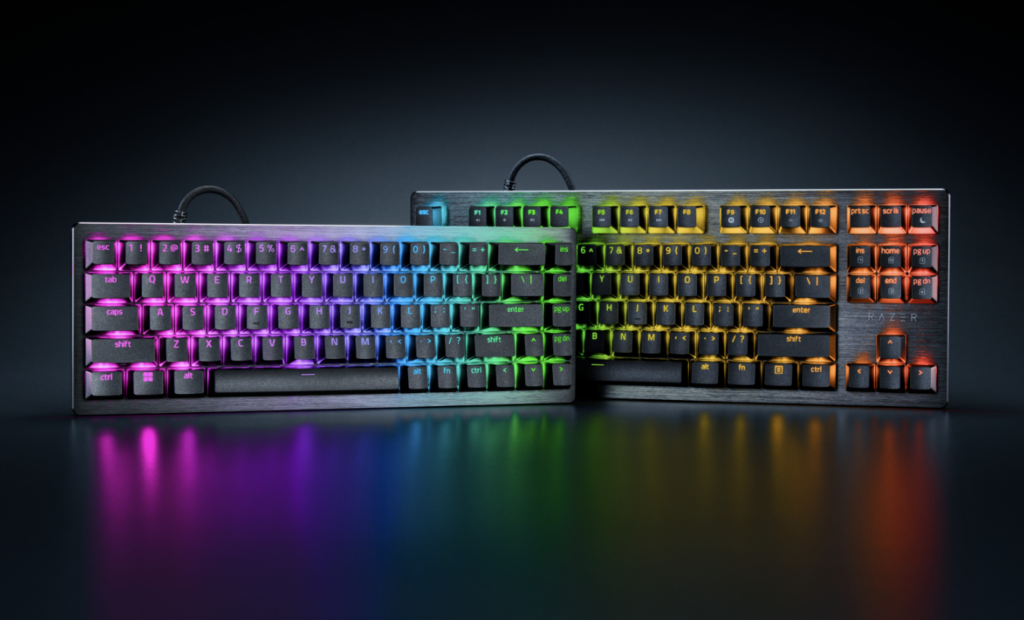
The Razer Huntsman V3 HE Magnetic 8KHz is available in two compact gaming-focused sizes: Tenkeyless and Mini 65%. Both versions use the same core performance features, including Razer™ Hall Effect Magnetic Switches, 8000 Hz HyperPolling, adjustable actuation, Rapid Trigger, Snap Tap, and Snap Flex.
- Tenkeyless: Keeps the function row, arrow keys, and navigation cluster, but removes the number pad. This is a strong choice if you want more mouse space while still keeping familiar keyboard controls for gaming, work, and general use.
- Mini 65%: A more compact layout that removes the function row and number pad while keeping dedicated arrow keys. This is best for players who want maximum desk space for mouse movement, especially in FPS games.
What Does 8KHz Mean in a Gaming Keyboard?
“8KHz” means the keyboard can send input updates to your computer up to 8,000 times per second. A typical gaming keyboard often uses 1,000 Hz polling, which means it reports input 1,000 times per second. In theory, 8,000 Hz gives your PC more frequent updates, which can reduce the time between pressing a key and seeing the result in-game.
For everyday typing, the difference may not feel dramatic. For competitive games, especially fast shooters, rhythm games, or titles where movement timing matters, lower input latency can help make controls feel sharper. The benefit is most noticeable when paired with a fast PC, a high-refresh-rate monitor, and games that can respond quickly to input.
What Are Razer™ Hall Effect Magnetic Switches?
Hall Effect magnetic switches use magnets and sensors instead of relying on traditional metal contacts. As you press a key, the keyboard detects the magnet’s position and can measure how far the key has travelled. Because the switch is contactless, it can support very fine actuation settings, fast resets, and consistent detection over time.
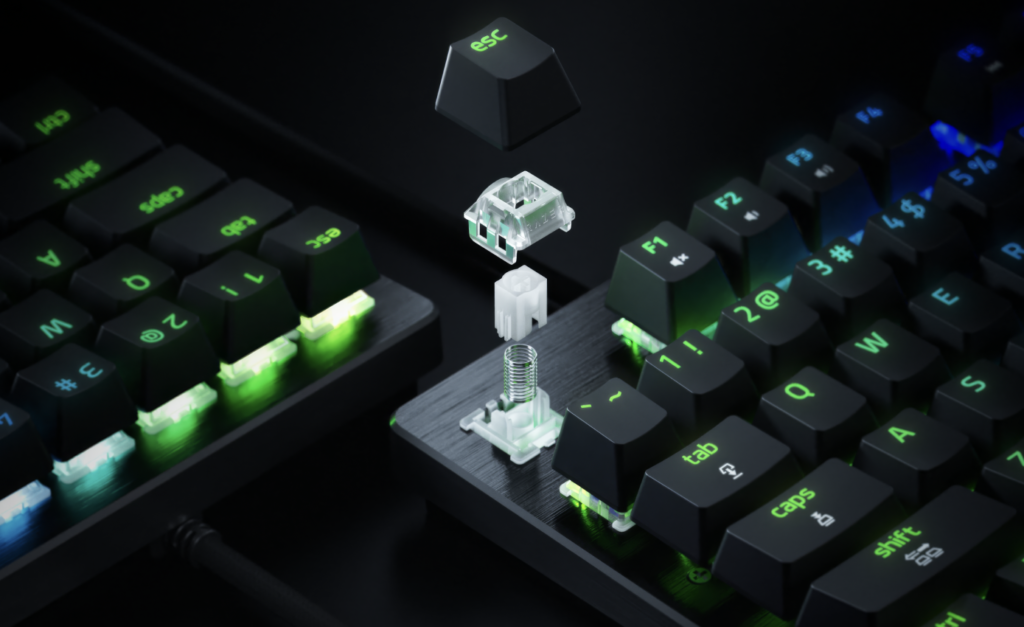
This is different from a standard mechanical switch, where a key usually activates at a fixed point. With Hall Effect switches, you can set a shallow actuation point for fast reactions, or a deeper actuation point to reduce accidental presses. That flexibility is one of the main reasons magnetic keyboards are popular with competitive players.
Why These Features Matter in Games
- FPS games: Rapid Trigger and low actuation can help with counter-strafing, quick peeks, dodging, and repeated movement taps.
- MOBA and MMO games: Adjustable actuation can make ability keys feel faster or safer depending on your preference.
- Rhythm and action games: Lower latency and fast resets can make rapid inputs feel more responsive.
- Everyday use: A deeper actuation setting can reduce accidental key presses while typing or working.
Beginner Setup Tips
- Start with a moderate actuation point: Try around 1.5 mm to 2.0 mm before going extremely low. Very shallow settings can feel fast but may cause accidental inputs.
- Use low actuation for movement keys: Many players tune WASD to be more sensitive while keeping typing keys deeper.
- Test Rapid Trigger gradually: It can feel strange at first because keys reset faster than traditional keyboards.
- Save profiles for different games: Competitive shooters, MOBAs, and general typing may all benefit from different settings.
- Pair it with the right setup: An 8KHz keyboard works best with a capable PC, stable USB connection, and high-refresh-rate display.
Who Should Buy It?
The Razer Huntsman V3 HE Magnetic 8KHz is best suited to competitive gamers who care about speed, movement precision, and custom key feel. If you mainly use your keyboard for casual gaming, school, work, or general typing, you may not need every advanced feature. But if you play fast-paced games and want a keyboard that lets you tune how each press behaves, the combination of Hall Effect switches, Rapid Trigger, Snap Tap, Snap Flex, and 8KHz polling makes this a serious esports-focused option.
Frequently Asked Questions
What does “HE Magnetic” mean?
“HE” stands for Hall Effect. In this keyboard, it means the switches use magnetic sensing to detect how far each key has moved, instead of relying on traditional metal contacts. This enables features such as adjustable actuation, Rapid Trigger, and more precise key tracking.
Is it a mechanical keyboard?
It has physical keys and a gaming-keyboard feel, but the switches are not traditional mechanical contact switches. They are magnetic Hall Effect switches, which is why the keyboard can measure key travel and support advanced input features.
Does 8KHz polling really matter?
It can matter most in competitive games where input timing is important. 8KHz polling means the keyboard can report inputs to the PC up to 8,000 times per second. Casual players may not notice a huge difference, but competitive players with high-refresh displays and fast PCs are more likely to benefit.
What is Rapid Trigger?
Rapid Trigger lets a key reset as soon as it starts moving upward, rather than waiting for it to return to a fixed reset point. This can make repeated taps feel faster and is especially useful for movement keys in FPS games.
What is Snap Tap?
Snap Tap prioritises the latest directional input between selected keys. For example, if you switch quickly between left and right movement, the keyboard can prioritise the newer input instead of leaving both directions competing with each other.
What is Snap Flex?
Snap Flex lets actions trigger on key release, giving advanced players more timing control. It is aimed at players who want to fine-tune inputs beyond a simple press-to-activate setup.
Can I change how sensitive the keys are?
Yes. You can adjust actuation from 0.1 mm to 4.0 mm. Lower actuation can feel faster for gaming, while deeper actuation can reduce accidental presses during typing.
Do I need Razer Synapse?
For full customisation, yes. Razer Synapse and Synapse Web are used to adjust actuation, Rapid Trigger, Snap Tap, profiles, lighting, and other advanced settings.
Is it good for everyday typing?
Yes, but the settings matter. Very shallow actuation can lead to accidental key presses, so many users will prefer deeper actuation for typing and lower actuation for gaming profiles.
Does it include a wrist rest or dedicated media controls?
No. This line focuses on compact esports performance, so it does not include a wrist rest, and media controls are handled through secondary-layer shortcuts rather than dedicated buttons.
Who gets the most benefit from this keyboard?
Competitive FPS and esports players will benefit the most, especially if they care about movement precision, low latency, and custom actuation. Casual gamers can still enjoy it, but many of its best features are designed for players who want to tune every input.
For gamers who do not know much about gaming keyboards, the big idea is this: the Razer Huntsman V3 HE Magnetic 8KHz is built to make input feel faster and more controllable. The 8KHz polling rate focuses on reducing delay, while the Hall Effect magnetic switches let you fine-tune how each key activates and resets. Together, these features are aimed at players who want every movement, tap, and release to feel as immediate as possible.