Pros and Cons
- Pros: Extreme desktop-replacement performance, Intel Core Ultra 9 285HX processor, RTX 5080 or RTX 5090 Laptop GPU options, 18-inch UHD+ Mini LED display, Thunderbolt 5, Wi-Fi 7, 2.5GbE Ethernet, huge storage expansion, mechanical per-key RGB keyboard, RGB haptic touchpad, strong audio hardware, and 99.9Wh battery.
- Cons: Very large and heavy, expensive, loud and warm under high-performance loads, brief gaming battery life, niche touchpad and mechanical-keyboard feel, and overkill for users who do not need top-tier GPU power.
The MSI Titan 18 HX AI A2XWX is not designed to be subtle. It is MSI’s flagship class of 18-inch gaming laptop, built for users who want maximum mobile performance and are willing to accept the size, weight, heat, noise, and price that come with it. This is closer to a transportable workstation than a regular everyday laptop.
The headline configuration pairs Intel’s Core Ultra 9 285HX processor with NVIDIA GeForce RTX 50-series graphics, including RTX 5080 and RTX 5090 Laptop GPU options. It also includes a large 18-inch display, four M.2 storage slots, Thunderbolt 5, Wi-Fi 7, and a 400W power adapter, making it one of the most unapologetically powerful laptops in MSI’s gaming range.
Design and Build Quality
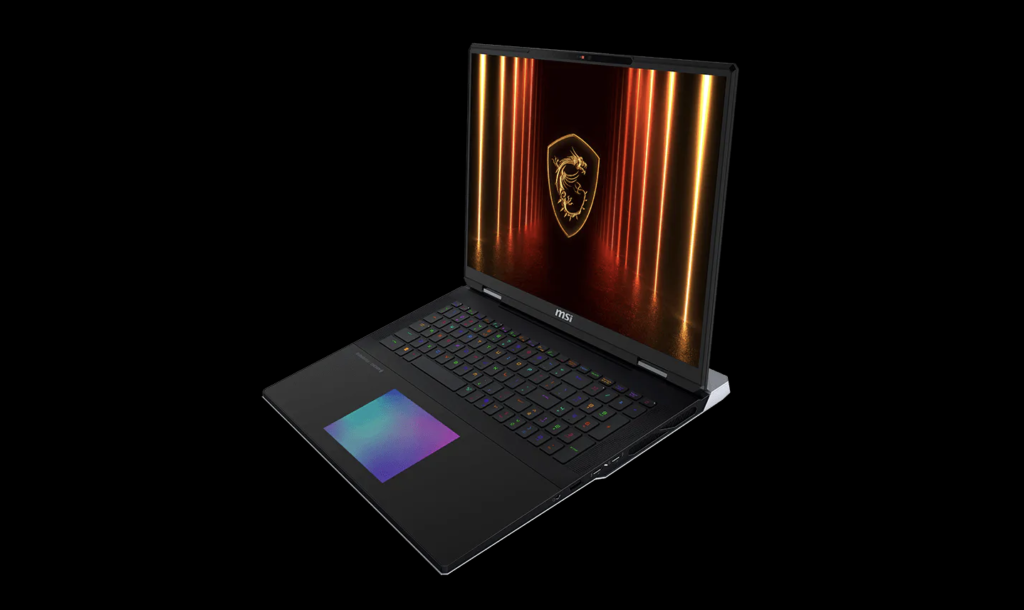
The Titan 18 HX AI has the presence of a flagship gaming machine. Its Core Black chassis, large rear vents, RGB accents, mechanical keyboard, and flush RGB haptic touchpad make it feel premium and deliberately high-end rather than minimal. At roughly 404 x 307.5 x 24–32.05 mm and around 3.6 kg, it is clearly built for desk-to-desk movement rather than daily commuting.
The payoff is expandability and cooling headroom. The larger chassis gives MSI room for high-power CPU and GPU operation, multiple SSD slots, large speakers, a full-size keyboard experience, and ports that make the laptop suitable as the centre of a serious gaming or creator desk setup.
Display: 18-inch Mini LED for Big-Screen Gaming
The standout panel option is an 18-inch UHD+ 3840 x 2400 Mini LED display with a 16:10 aspect ratio, 120Hz refresh rate, 100% DCI-P3 colour coverage, and VESA DisplayHDR 1000 certification. This gives the Titan a screen aimed at immersive gaming, HDR media, and colour-rich creator work.
The trade-off is that this display is not primarily an esports-first panel. A 120Hz 4K-class Mini LED screen is excellent for visual quality, cinematic games, editing, and media, but gamers who only care about maximum competitive refresh rates may prefer a lower-resolution 240Hz option where available.
Performance: Core Ultra 9 and RTX 50-Series Muscle
The Titan 18 HX AI A2XWX is built around Intel’s Core Ultra 9 285HX, a 24-core processor with 8 performance cores, 16 efficiency cores, 24 threads, 36MB of L3 cache, and boost speeds up to 5.5GHz. It also includes Intel AI Boost NPU support for AI-assisted workloads.
On the graphics side, the high-end RTX 5090 Laptop GPU configuration includes 24GB of GDDR7 memory and up to 175W maximum graphics power with Dynamic Boost. MSI’s OverBoost Ultra technology allows up to 270W combined CPU-GPU power in supported high-performance modes, which is a key reason this machine sits in the extreme desktop-replacement category.
Cooling, Power, and Noise
This is a laptop that performs best when plugged into its 400W adapter and used on a desk with good airflow. Under heavy gaming, rendering, and benchmark loads, users should expect fan noise and chassis warmth. That is the reality of running desktop-class power levels in a portable 18-inch body.
The advantage is sustained performance. If the goal is high-end gaming, 3D rendering, video editing, AI workloads, or streaming with minimal compromise, the Titan’s cooling and power configuration are part of its appeal. If quiet operation is more important than performance, this is not the right class of laptop.
Battery Life: Large Capacity, Desktop-Replacement Expectations
The 99.9Wh battery is large, but it should be understood in context. The Titan is powering an 18-inch Mini LED display, a high-end HX-class CPU, powerful RTX graphics, RGB lighting, and a large cooling system. It can handle lighter unplugged work, but it is not an all-day ultrabook.
Gaming on battery will significantly reduce performance and drain the system quickly. The battery is best viewed as a convenience for short movement between rooms or brief productivity sessions, not as the main way to use the laptop.
Gaming Experience
For modern AAA games, the Titan 18 HX AI is built to run high settings at very high resolutions, especially in RTX 5080 and RTX 5090 configurations. The RTX 5090 version is particularly suited to users who want maximum VRAM, heavy ray tracing, DLSS 4-class upscaling support, and a longer performance runway for future titles.
The 18-inch display makes open-world games, racing titles, cinematic action games, simulators, and creator previews feel expansive. Competitive players may still tune settings down for higher frame rates, but this laptop is fundamentally about visual quality and maximum performance rather than portability or value.
Creator and Workstation Use
The Titan is also highly relevant for creators and technical users. The large Mini LED display, high-core-count processor, RTX GPU acceleration, up to 96GB DDR5 memory support on official specifications, and four M.2 storage slots make it suitable for video editing, 3D modelling, motion graphics, data-heavy project work, and AI-assisted creative workflows.
Its greatest strength is consolidation: users who might otherwise need a gaming desktop, creator workstation, external dock, and large monitor can use the Titan as a single transportable centrepiece. The compromise is obvious: it is expensive, heavy, and happiest when used from a desk.
Detailed Specifications Table
| Category | MSI Titan 18 HX AI A2XWX Details |
| Model family | MSI Titan 18 HX AI A2XWX series |
| Processor | Intel Core Ultra 9 285HX with Intel AI Boost NPU; 24 cores, 24 threads, 36MB L3 cache, up to 5.5GHz max turbo frequency |
| Graphics | NVIDIA GeForce RTX 5080 or RTX 5090 Laptop GPU depending on configuration; RTX 5090 listed with 24GB GDDR7 and up to 175W maximum graphics power with Dynamic Boost |
| Combined power | Up to 270W CPU-GPU combined power with MSI OverBoost Ultra Technology on supported configurations and modes |
| Display | 18-inch UHD+ 3840 x 2400 Mini LED, 16:10, 120Hz, IPS-level, 100% DCI-P3, VESA DisplayHDR 1000 certification |
| Memory | DDR5 memory; official spec examples include 48GB x2, with up to DDR5-6400 and maximum 96GB across two slots |
| Storage | Up to four M.2 SSD slots: three NVMe PCIe Gen4-compatible slots and one NVMe PCIe Gen5-compatible slot; some listed configurations include one 2TB Gen5 SSD plus two 2TB Gen4 SSDs |
| Keyboard | Cherry mechanical per-key RGB gaming keyboard by SteelSeries with Copilot key |
| Touchpad | RGB haptic touchpad |
| Camera | IR FHD webcam at 1080p 30fps with HDR and 3D Noise Reduction+ |
| Audio | 4 x 2W speakers plus 2 x 2W woofers, Hi-Res Audio Ready, Nahimic 3 Audio Enhancer, Sound by Dynaudio, and array microphone |
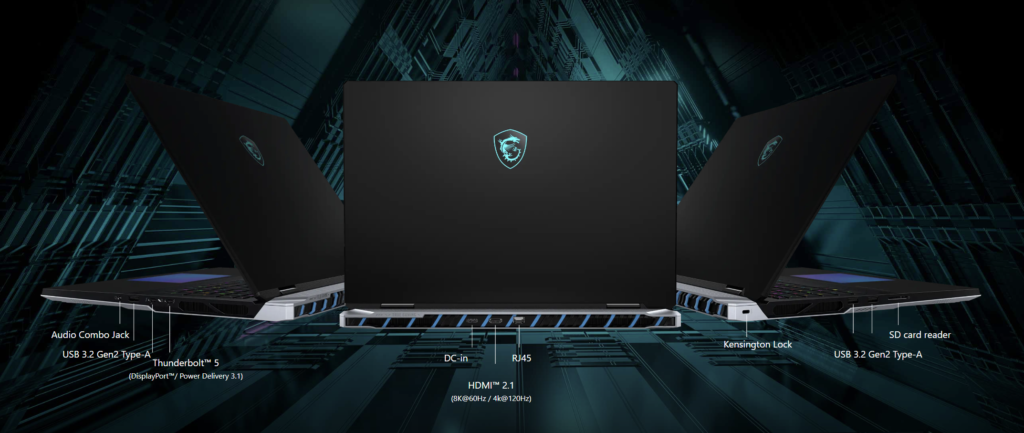
| Ports | 3 x USB-A 3.2 Gen 2, 2 x Thunderbolt 5 with DisplayPort and Power Delivery 3.1, HDMI 2.1 supporting 8K@60Hz or 4K@120Hz, SD Express card reader, 2.5GbE LAN, and 3.5mm audio combo jack |
| Wireless | Intel Killer Wi-Fi 7 BE1750 and Bluetooth 5.4 |
| Security | Firmware TPM 2.0, Kensington lock, Secured-core PC support, and webcam shutter |
| Battery | 4-cell 99.9Wh battery |
| Power adapter | 400W power adapter |
| Dimensions and weight | Approximately 404 x 307.5 x 24–32.05 mm; around 3.6 kg with battery |
| Best suited for | High-end gaming, 4K-class gaming, streaming, video editing, 3D rendering, AI workflows, software development, and desktop-replacement use |
Who Should Buy It?
The MSI Titan 18 HX AI A2XWX is for buyers who want one of the most powerful laptops available and are willing to pay for it. It suits serious gamers, streamers, 3D artists, video editors, AI developers, and professionals who need desktop-class performance in a machine that can still be moved when necessary.
It is not the best fit for students, frequent travellers, quiet-office users, or anyone who mainly needs a balanced everyday laptop. If portability, value, or battery life matter more than maximum performance, a lighter 16-inch or 14-inch gaming laptop will make more sense.
The MSI Titan 18 HX AI A2XWX is a flagship desktop-replacement laptop in the truest sense. It is big, expensive, loud under load, and completely excessive for casual users. But for the right buyer, that excess is the appeal. With Core Ultra 9 processing, RTX 50-series graphics, Mini LED visuals, Thunderbolt 5, Wi-Fi 7, massive storage expansion, and a premium input setup, it is built for people who want the most powerful portable gaming and creation platform MSI can offer.
FAQ
Is the MSI Titan 18 HX AI A2XWX good for gaming?
Yes. It is built for high-end gaming, especially in RTX 5080 and RTX 5090 configurations. The RTX 5090 version is especially strong for demanding games, high-resolution play, ray tracing, DLSS-assisted performance, and future headroom.
Is it portable?
Only in the desktop-replacement sense. At around 3.6 kg plus a large 400W adapter, it can be moved between locations, but it is not designed for comfortable daily commuting.
Can the storage be upgraded?
Yes. One of the Titan’s biggest strengths is storage expansion, with four M.2 SSD slots listed across the series: three PCIe Gen4-compatible slots and one PCIe Gen5-compatible slot.
Who should avoid this laptop?
Anyone who prioritises low weight, long unplugged battery life, quiet operation, or affordable pricing should look elsewhere. The Titan is for users who need extreme performance more than convenience.